Accessible Design of Consumer Products
SECTION 3: MANIPULATIONS. Includes all actions that must be
directly performed by a person inconcert with the device or for
routine maintenance (e.g., inserting disk,loading tape, changing
ink cartridge)
Maximize the number of people who can ...
M-1. Maximize the number of individuals who can ... physically
insert and/or remove objects as required in the operation of a
device.
Problem:
Insertion and/or removal of objects required to operate some devices
(e.g., diskettes, compact discs, cassette tapes, credit cards,
keys, coins, currency) may be physically impossible. In addition,
damage to the object or device can occur from unsuccessful attempts.
Examples:
- Individuals using mouth sticks or other assistive devices may
have difficulty grasping an object and manipulating it as required
to insert or retrieve it from the device.
- Individuals with poor motor control may be unable to place a
semi-fragile object accurately into the device and retrieve without
damage (e.g., bending of floppy disk or credit card).
- Individuals with severe weakness may have difficulty reaching
the slot (or positioning the object) for insertion or removal.
- Individuals who are blind may be unable to determine proper
orientation or alignment for insertion (i.e., object may be held
upside down, backward or at the wrong angle).
Design Options and Ideas to Consider:
Facilitating orientation and insertion.
- Ensuring that objects can be inserted (and removed) with minimal
user reach and dexterity.
- Providing a simple funnelling system or other self-guidance/orienting
mechanism which will properly position the object for insertion.
- Allowing receptacles to be repositioned or re-angled to be
more reachable.
- Whenever possible, allowing the object to be inserted in several
ways (e.g., a six-side wrench can be positioned in a mating bolt
six different ways; two sided keys can be inserted upside down).
- Providing visual contrast between insertion point and the
rest of the device (making a more obvious "target").
- Clearly marking the proper orientation both visually and tactilely.
Facilitating removal.
- Providing ample ejection distance to facilitate easy gripping
and removal. (Ejection distance as large as possible while still
retaining a stable ejection.) See Figure M-1-b.
- Using push-button ejection, or automatic (motorized) ejection
mechanism.
Facilitating handling.
- Making objects to be inserted rugged and able to take rough
handling.
- Using objects with high friction surfaces for ease in grasping.
Additional Information:
- Orientation can be easily marked tactilely by having a clipped
corner or unsymmetrical shape.
- Consumers without disabilities also appreciate easier loading
systems.
- Use existing media with a hard or stiff outer shell and self-closing
cover for sensitive parts, so that they will be resistant to rough
treatment (e.g., 3-1/2" diskettes with hard plastic covers,
or tapes with self-closing protective doors).
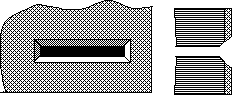 D
D
Figure M-1-a: Beveled slot facilitates insertion of cards,
disks, etc. Tactile and visual cues should also be provided to
indicate the proper orientation of the object to be inserted.
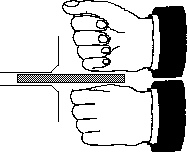 D
D
Figure M-1-b: Mechanisms which eject items at least 1"
and preferably 2" facilitate grasping of the item with tools,
reachers, teeth or fists for those who cannot effectively use
their hands/fingers.
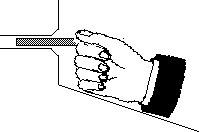 D
D
Figure M-1-c: Placing a stable surface under an insertion
slot allow individuals to steady their hand when inserting an
item. Be careful not to block access to the slot.
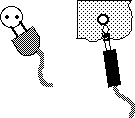 D
D
Figure M-1-d: Phone jacks (such as found on headphones)
are superior to two prong plugs because they can be inserted in
any orientation and do not have to be twisted to align connectors.
 D
D
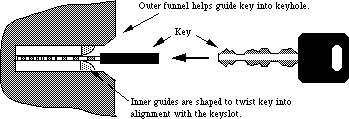
Figure M-1-e: Locks would be much easier to use if they
used two faced keys and had self orienting bevels that would turn
the key to the proper orientation to enter the slot. Alternately,
keys which do not have to be oriented could be used.
 D
D
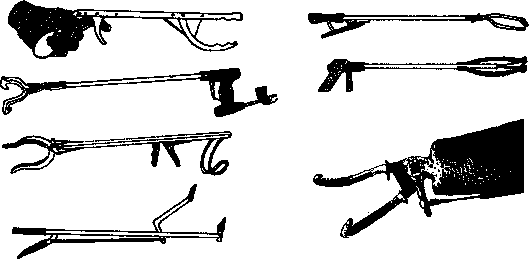
(Reachers: La Buda 1975)
Figure M-1-f: Different aids used for reaching and grasping
include
reachers, mouthsticks with special ends, artificial hands and
hooks.
M-2. Maximize the number of people who can ... physically
handle and/or open the product.
Problem:
Handles, doorknobs, drawers, trays, etc. may be impossible for
some individuals to grasp or open.
Examples:
- People using mouth sticks or other assistive devices may be
unable to grasp handles, doorknobs, etc. in order to open or operate
the product, and may find it impossible to open doors or drawers
without handles (e.g, those using recessed "lips," or
those utilizing only side pressure to open).
- People with limited arm and hand movement (due to arthritis
or cerebral palsy, for example) may have problems grasping handles
that are in-line (straight).
- People with only one hand or with poor coordination may have
difficulty opening products which require two simultaneous actions
(e.g., stabilizing while opening or operating two latches which
spring closed).
Design Options and Ideas to Consider:
- Using doors with open handles, levers or doors which are pushed,
then spring open.
- Avoiding use of knobs or lips to open products.
- Avoiding dual latches that must be operated simultaneously.
- Using latches which are operable with a closed fist.
- Using bearings for drawers or heavy objects that must be moved.
- Providing electric pushbutton or remote control power openers.
- Shaping product and door handles, etc. to minimize the need
for bending the wrist or body. (See figure below for examples.)
- See I-5 for additional
suggestions.
Additional Information:
- Offset handles are easier to grasp. A handle that is offset
with a longer horizontal shank at the bottom would be better than
one with a longer horizontal shank on top. This style is preferable
to knobs.
M-3. Maximize the number of people who can ... remove, replace,
or reposition often-used detachable parts.
Problem:
Covers, lids and other detachable parts may be difficult to remove,
replace, or reposition.
Examples:
- Individuals with poor motor control may be unable to replace
a cover or lid once it has been detached, because it was dropped
to the floor or into an inaccessible part of the product.
- Individuals with weakness may have difficulty repositioning
a keyboard, monitor or television if the resistance to movement
is high.
Design Options and Ideas to Consider:
- Devices with covers or lids could be hinged, have sliding
covers, or be electronically operated.
- Tethering covers and lids with a cord or wire.
- Making device components repositionable with a minimum of
force.
- Eliminate or limit tasks needed for consumer assembly, installation,
or maintenance of product.
Additional Information:
- Heavy or frequently positioned devices should be on a swivel
or other special base to facilitate repositioning.
M-4. Maximize the number of people who can ... understand
how to carry out the manipulations necessary to use the product.
Problem:
Some individuals may have difficulty remembering how to operate
the product, performing tasks in the correct order or within the
required time, making choices, doing required measurements, or
problem-solving.
Examples:
Some people (particularly those with learning disabilities or
cognitive impairments):
- have difficulty remembering codes required to operate a device
(e.g., PIN number for automated teller machine); they may also
be unable to remember which control to push to start or stop the
device.
- have difficulty with serial order recall (the ability to remember
items or tasks in sequence), and thus cannot follow complex or
numerous steps.
- have a slower or delayed reaction time, due to their inability
to remember things quickly or to make responses that are dependent
on timed input.
- get confused when there is a time lag for a response after
they issue a command or when they expect an immediate result.
- have trouble in choosing from available selection options
(e.g., selecting paper size on a printer, choosing settings on
a stereo).
- cannot understand the concept of measuring/quantifying.
- have significant difficulty finding out what and where the
problem is when a device is not functioning properly, and may
have difficulty identifying solutions to problems they have identified.
Design Options and Ideas to Consider:
Many of the problems in this category are similar to the problems
outlined in I-6 and many of the same
design ideas would
apply, including the following:
- Keeping things as simple as possible.
- Providing cues or prompts for sequences of actions required.
- Writing the instructions directly on the device.
- Having programmable keys for commonly used sequences.
- Providing an easy way out of any situation.
- Eliminating any timed responses (or make the times adjustable).
- Providing feedback to the user when the device is busy or
"thinking."
- Hiding seldom used controls which are not used primarily in
order to limit available choices.
Other design suggestions include:
- Incorporating pre-measuring methods whenever a quantifiable
amount is required.
- Providing prompts to inform users about the source(s) of problems
and lead them to action to be taken to solve the problems (e.g.,
lights and color-coded pictorials used in copying machines).
- Eliminating or simplifying consumer assembly, installation,
and maintenance of the product.
- Providing a "standard" key or default mode to operate
standardized functions (e.g., a key on the copier to give standard
size copies).
- Providing an automatic mode so that the machine will make
self-adjustments.
Additional Information:
- Examples of pre-measuring methods include pump-type dispensers,
individualized pre-measured packets and measuring devices incorporated
on the container (e.g., cap).
- Frequently used symbols and words for labelling controls can
be used to facilitate memory. Meanings for standardized symbols
and signs will be easier to remember.
- Break large tasks down into easily manageable steps by combining
commonly used sequences as a single choice (e.g., buttons on a
radio, macros, code numbers for recording specific programs on
the VCR).
- Sequences used to operate a device can be written on the device
so they do not have to be remembered.
- The device could bring up a hierarchical menu or prompts to
step the user through the operating sequence.
- Feedback could be provided to the user to identify the step
they are on or have just finished (e.g., beep when completed,
highlighting of next step in sequence menu).
- Information could be repeated/restated after a certain length
of time when no response is received, in order to cue the user
that a response is needed or to get the person's attention back
to the display.
- Warning cues can help increase the response time, when presented
immediately before the visual stimuli (e.g., auditory cue heard
before the elevator doors open).
- Several studies have shown that even the simple reaction time
at age 60 to respond to a visual or auditory stimuli is about
3 times slower than a 20-year-old.
- Devices that do not stop immediately after hitting a stop
button are confusing and can be dangerous without any visual indication.
GO to PREVIOUS SECTION -
GO to NEXT SECTION